How to Find Free TradingView Strategies (and Automate Them)
Discover the TradingView Community tab packed with free open-source strategies — customize them with AI, forward test, and automate your trades.

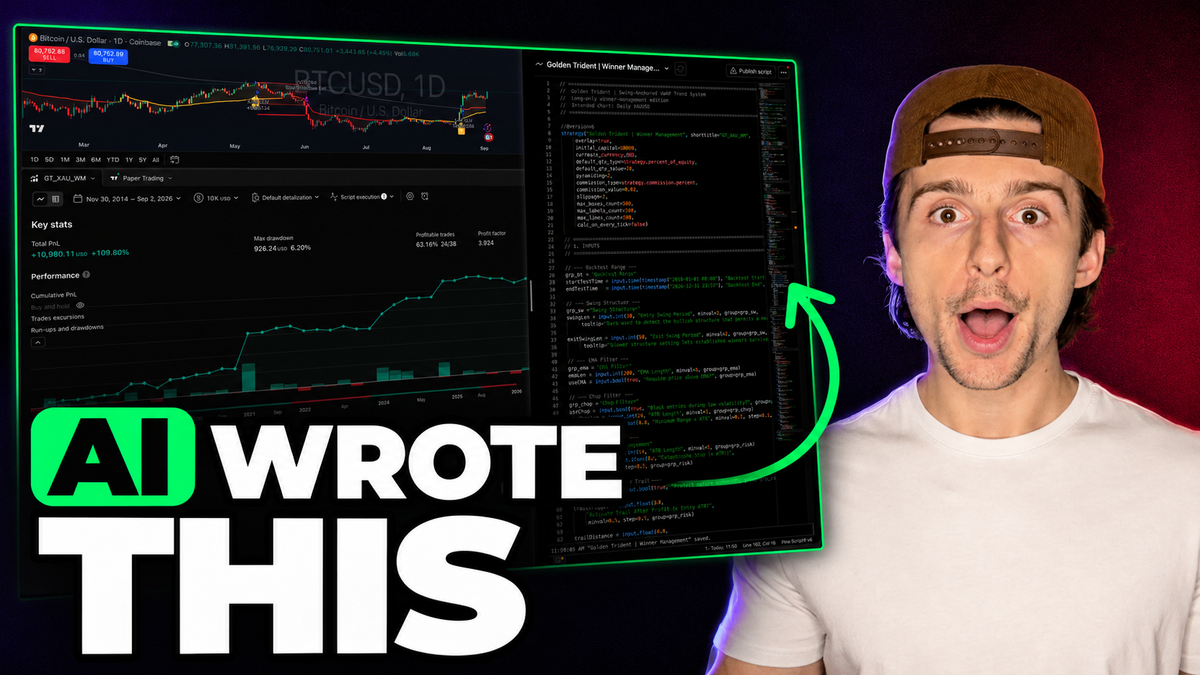
There are tens of thousands of free TradingView strategies sitting inside a single tab that most traders never open — complete with buy and sell signals, backtest reports, and open-source code you can copy in seconds. Even better: you can customize one of these strategies, forward test it, and automate the trades in a matter of minutes.
This guide from AlphaInsider walks through the entire process: where the tab lives, how to filter for the strategies worth your time, how to make a strategy your own with AI, and how to forward test and automate it so the trades place themselves.
Table of Contents
- Key Takeaways
- Why Free TradingView Strategies Are Worth Your Time
- The Alpha Decay Problem
- Prerequisites / What You'll Need
- Part One: Find and Customize a Strategy on TradingView
- Why a Profitable Backtest Isn't Enough
- Part Two: Forward Test and Automate with AlphaInsider
- Tips & Best Practices
- Common Mistakes to Avoid
- Frequently Asked Questions
- Conclusion
Key Takeaways
- TradingView's Community tab hides tens of thousands of strategies and indicators, refreshed constantly — filter to "Strategies" and "Open-source only" to find code you can actually use.
- Free strategies aren't the finished product — they're the starting point. Customize the settings and code so you've developed your own strategy, not copied someone else's.
- Alpha decay is real: the more people trade a public edge, the faster it degrades. Changing the strategy is how you keep an edge that's yours.
- AI makes customization easy — paste the source code into ChatGPT, ask for improvements, and iterate until the backtest looks the way you want.
- Settings changes alone can transform results: one example went from modest returns to a 100% return over six years with a 13% max drawdown just by adjusting order size and commissions.
- A profitable backtest does not guarantee profitable live trading — curve fitting and repainting can make backtests lie, which is why forward testing matters.
- Your first strategy automation is completely free, with Alpaca for stocks and Hyperliquid, Bitfinex, and Binance for crypto.
Why Free TradingView Strategies Are Worth Your Time
The obvious objection first: if a strategy is free on TradingView and anyone can pull the source code in seconds, how could it possibly be profitable?
That question misses the point. A free strategy gives you a base — a starting point. You can customize it, adapt it, change it, and make the settings completely yours. By the end, you're not copying someone else's strategy; you've developed your own strategy based on somebody else's. They just got the ideas flowing, and now you can run with them.
The Alpha Decay Problem
There's a second reason customization isn't optional. Anything posted publicly gets found — people test these strategies, bots scrape them, and if a strategy genuinely works, more and more traders pile in.
That's when alpha decay kicks in: the degrading of an edge. The more people take advantage of the same edge, the more that edge erodes over time.
Some degree of alpha decay is always possible. The defense is to change the strategy — adjust it, adapt it, make it different from what everyone else is running. And with AI, that's easier today than it has ever been.
Prerequisites / What You'll Need
- A TradingView account — a premium plan is needed for open-ended alerts when you automate.
- A free AlphaInsider account for forward testing and automation.
- An AI assistant like ChatGPT for customizing strategy code (no coding skills required).
- A broker for automation (optional, later): Alpaca for stocks — with a paper account option — or Hyperliquid, Bitfinex, or Binance for crypto.
- Time: the setup itself takes minutes; browsing strategies can happily eat hours.
- Skill level: beginner-friendly — every step is point and click, and AI handles the code.
Part One: Find and Customize a Strategy on TradingView
Step 1: Open the Community Tab
Go to tradingview.com and stay on the homepage — don't open any charts. Click the Community tab at the top, then go down to Indicators and Strategies.
You'll land on a page with a massive log of strategies and indicators. This is the tab most traders never open.
Step 2: Filter to Open-Source Strategies
The crucial move is filtering out what you don't want:
- On the right-hand side, change All Types to Strategies. These have actual buy and sell signals — real executions you can follow, backtest, and automate — rather than an indicator you'd still have to build a strategy around.
- Select Open-source only. This means that when you click a strategy, you get access to the code — you can copy it, use it on your own charts, and do whatever you want with it.
- Use the sort options in the top right to browse by most recent or most popular.
This page is constantly being refreshed. If you last checked a week or two ago, come back — there's probably a batch of new strategies you're missing.
Step 3: Evaluate the Backtest
Here's a real example of the discovery process: a "Golden Ticket" swing anchored VWAP strategy, uploaded just 11 minutes earlier. Clicking in shows a full write-up — what it is, how it works, its features, and tips for use — plus a strategy report with the backtest.
The initial report showed a 2.69% drawdown with 13% profit since 2025. Take it with a grain of salt, but consider the risk-reward: a 13% P&L against roughly 2% risked is strong, and the video notes that scaling position sizing up five to ten times — risking 10–20% of the account — would put the return in the 100% range.
Next, click Use on Chart to load it onto your own chart. On gold, it showed a similar equity curve: a 3% max drawdown, 14.64% P&L, 179 trades, and a profit factor of 1.458. Setting a custom date range from 2020 to now revealed the strategy didn't really pick up until about 2023 — but still held a 1.964 profit factor on the 4-hour timeframe across the whole period. Not bad, with room for improvement.
Step 4: Make Your Own Copy of the Code
With the strategy loaded on your chart, click the small brackets icon to open the source code. It will tell you it's a read-only script — to edit it, click Make a Copy.
Now you own an editable copy. If you know how to code, start making adjustments directly. If you don't, the next step is for you.
Step 5: Customize the Strategy with AI
Copy the entire source code and paste it into something like ChatGPT with a prompt along these lines:
"Take a look at this strategy. I want to take better advantage of winning trades. Can you suggest some adjustments to the code, or additions, to make that happen?"
This is where your creativity can explode — ask for whatever you want. When the suggestions come back, they might look confusing if you're not familiar with code, but the responses are readable enough that your reaction will often be: "That makes a lot of sense — I want this one, this one, and this one."
Tell the AI which recommendations you like, have it regenerate the code, and paste the new version right over the top of your copy. Then rerun the backtest, adjust, and rinse and repeat until you have a strategy you really like — one that makes sense to you and ideally shows a profitable edge.
Step 6: Tune the Strategy Tester Settings
Code isn't the only lever. In the Strategy Tester, open Settings and review:
- Order size: the default comes from how the code was written — you can change it (say, to 100% of your account).
- Commission: if your brokerage charges zero commissions, set it to zero for a more accurate backtest.
- Slippage: around two ticks is reasonable depending on how quickly you trade. If you're not automating, you absolutely must add slippage — it's literally impossible to receive an alert, execute manually, and get filled with zero slippage.
- Inputs: toggle short entries, change the filters, adjust the exponential moving average length, and modify your stops.
Every one of these changes makes the edge different — and that's the point. In the gold example, changing only the order size from 20% to 100% and removing commissions transformed the report into a 100% return over the past six years with a 13% max drawdown and a 2.036 profit factor. Turning on short entries, by contrast, added trades but clearly hurt performance — so shorts stayed off.
Why a Profitable Backtest Isn't Enough
Here's the hard truth: a profitable backtest does not guarantee a profitable forward test or a profitable live trading environment.
A real portfolio of forward-tested strategies makes the point — some good, some absolutely horrible. One volume squeeze breakout strategy was a steady loser in live conditions. It wasn't automated because it looked bad; it was brought in specifically to see how it would trade live — and in live conditions, it simply didn't hold up.
Why does this happen?
- Curve fitting: the strategy may have been over-optimized to past data.
- Repainting: how the strategy's logic operates live versus how the backtest evaluates it can be two different things.
- No tick-by-tick data: backtests may assume fills after a candle closes, so you can't accurately see where you would have really entered or exited once alerts start firing in real time.
The only way to know whether a strategy trades like its backtest suggests is to forward test it — run it live, in real market conditions, without risking real money.
Ready to forward test your strategy?
Create a free account — your first strategy automation is completely free.
Part Two: Forward Test and Automate with AlphaInsider
Step 7: Create the Strategy on AlphaInsider
Make a free AlphaInsider account, then click New Strategy and set it up:
- Name it clearly — for example, what it trades (GLD in this walkthrough) plus the name of the strategy on TradingView, so you can always match the two up.
- Starting balance: purely hypothetical — it just tracks how the strategy trades over time; it's not your actual funds.
- Type: stock strategy.
- Visibility: making it public lets anyone else see it and follow along.
The new strategy starts as a blank slate. Click the three dots, then Connections, and follow the steps shown there.
Step 8: Connect the TradingView Alert
Back on TradingView, find your customized strategy on the chart, click the three dots, and choose Add Alert. Then wire the two platforms together:
- Condition: the strategy, same as chart. Open-ended is great if you have a premium TradingView plan.
- Webhook URL: copy it from the AlphaInsider Connections page and paste it into the alert's notifications settings.
- Message: copy the message block from Connections and paste it into the alert message.
- Leverage: this walkthrough uses 1.5x; leverage can go up to 2x.
- Stock ID: type in the ticker (GLD here), hit the copy icon next to the result, and paste it in.
- API token: if you don't have one saved, go to the three dots → Connections → the developer settings page and create an API key. Save it — you can reuse the same key for multiple strategies instead of making new ones.
- Click Apply, then Create. In your alerts tab you'll see it activating, then active.
Finally, save your untitled script copy to your TradingView account so nothing is lost. From here, every single time a trade fires on the strategy, it gets sent to AlphaInsider, where the trades are taken and tracked — your forward test is live, showing whether the strategy actually trades like the backtest promised.
Step 9: Auto-Trade When the Forward Test Earns It
Let the forward test accumulate trades. If you like the performance, click Auto Trade in the top right of the strategy page:
- For stocks, the best place for automations is Alpaca — and stay tuned, additional brokers may become available.
- For crypto, it's Hyperliquid (one of the best decentralized exchanges out there), Bitfinex, and Binance.
Select your broker and connect your API keys (public and private). Want a dry run? Connect an Alpaca paper account and effectively paper trade your automations — it's free, easy, and highly recommended.
Then allocate your trading bot. You can put your entire dedicated account behind one strategy, or just 1%, 5%, 10%, 50% — whatever percentage you're comfortable with. You can also add additional strategies, or subscriptions to other people's strategies, each with its own allocation. From your bot's monitoring page you can watch performance over time, see all your strategies, and add new ones at any time.
If you've got a profitable strategy, you've now got a profitable automation — trades place themselves without you lifting a finger.
Tips & Best Practices
- Check the Community tab regularly — it refreshes constantly, and strategies uploaded minutes ago can be genuinely interesting.
- Use custom date ranges in the Strategy Tester to see how a strategy held up across different periods, not just its best stretch.
- Match the backtest to your reality: zero commissions if your broker charges none, and realistic slippage if you'll trade manually.
- Iterate with AI in rounds: request suggestions, cherry-pick the ones that make sense, regenerate, retest, repeat.
- Save your API token so connecting each new strategy takes seconds.
- Paper trade your automation first through an Alpaca paper account before committing real funds.
Common Mistakes to Avoid
- Trading a public strategy as-is. Unmodified public edges decay fastest — customization is the whole game.
- Skipping slippage on manual setups. If alerts come to your phone and you execute by hand, zero slippage is impossible — model it.
- Trusting the backtest blindly. Curve fitting and repainting can make a losing strategy look brilliant on paper — forward test first.
- Flipping on every input. Enabling short entries in the example added trades and dragged down results; test each change on its own.
- Forgetting to save your script copy to your TradingView account after customizing it.
Frequently Asked Questions
Where are the free strategies on TradingView?
From the tradingview.com homepage — without opening a chart — go to the Community tab, then Indicators and Strategies. Filter the type to "Strategies" and select "Open-source only."
What's the difference between an indicator and a strategy?
A strategy has actual buy and sell signals — executions you can follow, backtest, and automate. An indicator only guides you; you'd still have to build your own rules around it.
What does "open-source" mean on TradingView?
It means the strategy's code is fully accessible. You can copy it, load it on your own charts, edit it, and do whatever you want with it.
Are free TradingView strategies actually profitable?
Treat them as a base, not a finished product. The value is the starting point: customize the settings and code until you've effectively developed your own strategy with its own edge.
What is alpha decay?
The degrading of a trading edge over time as more people exploit it. Public strategies get scraped and copied, so an unmodified public edge tends to erode — which is why you adapt the strategy to make it yours.
Why do backtests differ from live results?
Common culprits are curve fitting (over-optimizing to past data) and repainting — the live logic and the backtest logic evaluating differently, especially without tick-by-tick data, so real fills land in different places than the backtest assumed.
Do I need to know how to code?
No. Copy the strategy's source code into an AI like ChatGPT, describe what you want (for example, "take better advantage of winning trades"), pick the suggestions you like, and paste the regenerated code back in.
Which brokers support automation?
Alpaca for stocks (with a paper account option for testing, and possibly more brokers to come), and Hyperliquid, Bitfinex, and Binance for crypto.
How much does it cost to automate a strategy?
Your first strategy automation is completely free, and creating an account for forward testing is free too.
Conclusion
The path is now clear: open the TradingView Community tab, filter the free TradingView strategies down to open-source ones with real signals, copy the code, and reshape it with AI and settings changes until the strategy is genuinely yours. Then forward test it to verify the backtest wasn't lying — and when the live results earn it, automate the trades so every signal executes without you.
Your first strategy automation is completely free. Create your AlphaInsider account, connect your first strategy, and find out whether that backtest is the real thing.